Tutorials: Difference between revisions
Jump to navigation
Jump to search
Content deleted Content added
link to liftoff tutorial, new section litho tutorials |
moved stepper masks into mask making section, link to "how photomasks are made" page |
||
| (8 intermediate revisions by the same user not shown) | |||
| Line 1: | Line 1: | ||
The following are various tutorials from our NanoFab Wiki, collected here for your convenience. |
|||
| ⚫ | |||
__TOC__ |
|||
| ⚫ | |||
:[[File:CAD Tutorial for ASML Reticle v1 - screenshot Device Layout cell.png|alt=screenshot of KLayout view of Device_Layout|thumb|300x300px|KLayout: example CAD file.]] |
|||
== Fabrication Tracking and Process Design == |
|||
Designing experiments, tracking your fabrication steps/process improvements, and keeping track of your results are key to achieving repeatable and improved results! |
|||
See this tutorial for example Travelers, Design of Experiments, and Manufacturing Execution Systems: |
|||
* [[Processing - How Do I…?#Experiment%20Setup|'''Processing | Experiment Setup''']] |
|||
{| class="wikitable" |
|||
|+Examples of Trello + Google Drive for tracking fabrication jobs |
|||
|[[File:Trello - Example Job Cards.png|alt=Trello - Example Job Cards screenshot|none|thumb|367x367px|Tracking to-do and completed tasks.]][[File:Google Drive - Example Job Folder.png|alt=Google Drive - Example Job Folder screenshot|none|thumb|327x327px|Example Job Folder on Google Drive with in-process traveler, microscope/SEM images, testing results etc.]] |
|||
|[[File:Trello - example job card.png|alt=Trello - example job card screenshot|none|thumb|504x504px|Example job card for a fabrication run.]] |
|||
|} |
|||
| ⚫ | |||
| ⚫ | :Here are pages to help you design your devices in drawing programs, and make photomasks (aka. "masks" or "reticles") for various systems in our lab.[[File:CAD Tutorial for ASML Reticle v1 - screenshot Device Layout cell.png|alt=screenshot of KLayout view of Device_Layout|thumb|300x300px|KLayout: example CAD file.]] |
||
Microfabrication CAD drawings are simple 2D drawings with layers, even though they are intended to become 3D devices through the fabrication process. The fabrication is all top-down, hence only 2D patterning is used. |
Microfabrication CAD drawings are simple 2D drawings with layers, even though they are intended to become 3D devices through the fabrication process. The fabrication is all top-down, hence only 2D patterning is used. |
||
| Line 10: | Line 25: | ||
* [[Calculators + Utilities#CAD%20Files%20%26%20Templates|Calculators + Utilities > CAD Files & Templates]] - example GDS/OAS files for various useful structures (alignment marks, verniers, fonts etc) |
* [[Calculators + Utilities#CAD%20Files%20%26%20Templates|Calculators + Utilities > CAD Files & Templates]] - example GDS/OAS files for various useful structures (alignment marks, verniers, fonts etc) |
||
== |
== Mask Making Guidelines == |
||
''Info for mask/CAD layout for specific tools.'' |
|||
==== General ==== |
|||
| ⚫ | |||
* See [[Tutorials#CAD/Drawing Mask Plates|CAD tutorials above]] for layout tips and examples. |
|||
* [[Tutorial - How Photomasks are Made]] - this will help you submit your mask orders and clear up common misconceptions. |
|||
==== Stepper Mask Tutorials ==== |
|||
[[File:Stepper Reticle Tutorial - Reticle Masking Schematic.png|alt=Schematic of stepper blocking off adjacent Images on reticle and exposure onto different wafer locations.|thumb|'''[https://wiki.nanofab.ucsb.edu/w/images/c/cb/Demis_D_John_-_Stepper_Reticle_Layout_vs_Wafer_Layout.pdf Click for Stepper Reticle Tutorial]''' Stepper Reticle Patterns (“images”) can optionally be much more sophisticated and flexible than contact plates.|link=https://wiki.nanofab.ucsb.edu/w/images/c/cb/Demis_D_John_-_Stepper_Reticle_Layout_vs_Wafer_Layout.pdf]] |
[[File:Stepper Reticle Tutorial - Reticle Masking Schematic.png|alt=Schematic of stepper blocking off adjacent Images on reticle and exposure onto different wafer locations.|thumb|'''[https://wiki.nanofab.ucsb.edu/w/images/c/cb/Demis_D_John_-_Stepper_Reticle_Layout_vs_Wafer_Layout.pdf Click for Stepper Reticle Tutorial]''' Stepper Reticle Patterns (“images”) can optionally be much more sophisticated and flexible than contact plates.|link=https://wiki.nanofab.ucsb.edu/w/images/c/cb/Demis_D_John_-_Stepper_Reticle_Layout_vs_Wafer_Layout.pdf]] |
||
| Line 16: | Line 39: | ||
* '''[[Stepper Reticle Layout (Advanced) - Complex Experiments and Variations]]''' - If you need many design variations on your wafer. |
* '''[[Stepper Reticle Layout (Advanced) - Complex Experiments and Variations]]''' - If you need many design variations on your wafer. |
||
==== Steppers ==== |
|||
== Mask Making Guidelines == |
|||
| ⚫ | |||
| ⚫ | |||
| ⚫ | |||
| ⚫ | |||
| ⚫ | |||
** ''Access is restricted to trained users only by ASML's requirement - please contact [[Demis D. John|tool supervisor]] for access.'' |
** ''Access is restricted to trained users only by ASML's requirement - please contact [[Demis D. John|tool supervisor]] for access.'' |
||
* [[Autostep 200 Mask Making Guidance]] - information on designing and ordering your photomasks for the GCA AutoStep 200. |
* [[Autostep 200 Mask Making Guidance]] - information on designing and ordering your photomasks for the GCA AutoStep 200. |
||
* [[GCA 6300 Mask Making Guidance]] (''Work in progress'') - GCA 6300 Stepper |
* [[GCA 6300 Mask Making Guidance]] (''Work in progress'') - GCA 6300 Stepper |
||
==== Contact Aligners ==== |
|||
* [[Mask Making Guidelines for Contact Aligners|Mask Making Guidelines - Contact Masks]] - for the MJB-3 & MA6 Contact Aligners |
* [[Mask Making Guidelines for Contact Aligners|Mask Making Guidelines - Contact Masks]] - for the MJB-3 & MA6 Contact Aligners |
||
==== Direct-Write ==== |
|||
* [[MLA150 - Design Guidelines]] - for the Heidelberg MLA150 Direct-Writer |
* [[MLA150 - Design Guidelines]] - for the Heidelberg MLA150 Direct-Writer |
||
| Line 32: | Line 56: | ||
* [[Lithography Calibration - Analyzing a Focus-Exposure Matrix|Lithography Calibration - Analyzing a Focus-Exposure Matrix (FEM)]] - Projection litho systems (steppers, direct-writers) usually require a lithography calibration, using a Focus-Exposure Matrix/Array (FEM/FEA). |
* [[Lithography Calibration - Analyzing a Focus-Exposure Matrix|Lithography Calibration - Analyzing a Focus-Exposure Matrix (FEM)]] - Projection litho systems (steppers, direct-writers) usually require a lithography calibration, using a Focus-Exposure Matrix/Array (FEM/FEA). |
||
*{{fl|Liftoff-Techniques.pdf|Lift-Off Description/Tutorial}} - How it works, process limits and considerations for designing your process. |
*{{fl|Liftoff-Techniques.pdf|Lift-Off Description/Tutorial}} - How it works, process limits and considerations for designing your process. |
||
== General Fabrication == |
|||
* [[Processing - How Do I…?]] ← This page attempts to list common solutions to fabrication issues our lab users often run into. |
|||
Latest revision as of 04:37, 5 August 2025
The following are various tutorials from our NanoFab Wiki, collected here for your convenience.
Fabrication Tracking and Process Design
Designing experiments, tracking your fabrication steps/process improvements, and keeping track of your results are key to achieving repeatable and improved results!
See this tutorial for example Travelers, Design of Experiments, and Manufacturing Execution Systems:
  |
 |
CAD/Drawing Mask Plates
- Here are pages to help you design your devices in drawing programs, and make photomasks (aka. "masks" or "reticles") for various systems in our lab.
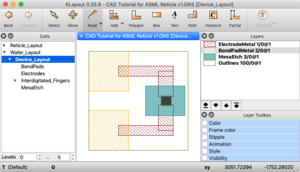
KLayout: example CAD file.

Microfabrication CAD drawings are simple 2D drawings with layers, even though they are intended to become 3D devices through the fabrication process. The fabrication is all top-down, hence only 2D patterning is used.
- Calculators + Utilities > CAD Layout and Mask Design - links to drawing programs and tutorials
- Calculators + Utilities > CAD Design Tips - key concepts you should utilize in your drawings, and tips for setting up your CAD programs
- Calculators + Utilities > Example CAD File - example stepper mask CAD files, including advanced layout for multiple experiments.
- Calculators + Utilities > CAD Files & Templates - example GDS/OAS files for various useful structures (alignment marks, verniers, fonts etc)
Mask Making Guidelines
Info for mask/CAD layout for specific tools.
General
- Photomask Ordering Procedure for UCSB Users - see this page for how to submit your order into the purchasing system.
- See CAD tutorials above for layout tips and examples.
- Tutorial - How Photomasks are Made - this will help you submit your mask orders and clear up common misconceptions.
Stepper Mask Tutorials
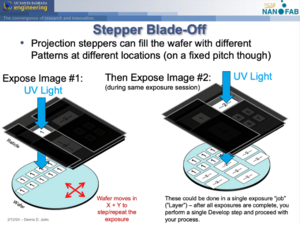
- Stepper Reticle Layout vs Wafer Layout (Demis D. John) - explains how Stepper mask layout is very different than other litho systems.
- Stepper Reticle Layout (Advanced) - Complex Experiments and Variations - If you need many design variations on your wafer.
Steppers
- Stepper Mask-Making Guidelines - Info needed to design and order a reticle for our Stepper systems.
- ASML-specific Mask Making Guidelines (Private) - More detailed info to design and order a reticle for this specific ASML system.
- Access is restricted to trained users only by ASML's requirement - please contact tool supervisor for access.
- Autostep 200 Mask Making Guidance - information on designing and ordering your photomasks for the GCA AutoStep 200.
- GCA 6300 Mask Making Guidance (Work in progress) - GCA 6300 Stepper
Contact Aligners
- Mask Making Guidelines - Contact Masks - for the MJB-3 & MA6 Contact Aligners
Direct-Write
- MLA150 - Design Guidelines - for the Heidelberg MLA150 Direct-Writer
Lithography Tutorials
- Lithography Calibration - Analyzing a Focus-Exposure Matrix (FEM) - Projection litho systems (steppers, direct-writers) usually require a lithography calibration, using a Focus-Exposure Matrix/Array (FEM/FEA).
- Lift-Off Description/Tutorial - How it works, process limits and considerations for designing your process.
General Fabrication
- Processing - How Do I…? ← This page attempts to list common solutions to fabrication issues our lab users often run into.